Best Gigabyte GA-B85M-D3H-A Motherboard
Best Gigabyte GA-B85M-D3H-A Motherboard: Features, Specifications and Complete Overview
₹2,100 Only
Get this motherboard at an affordable price
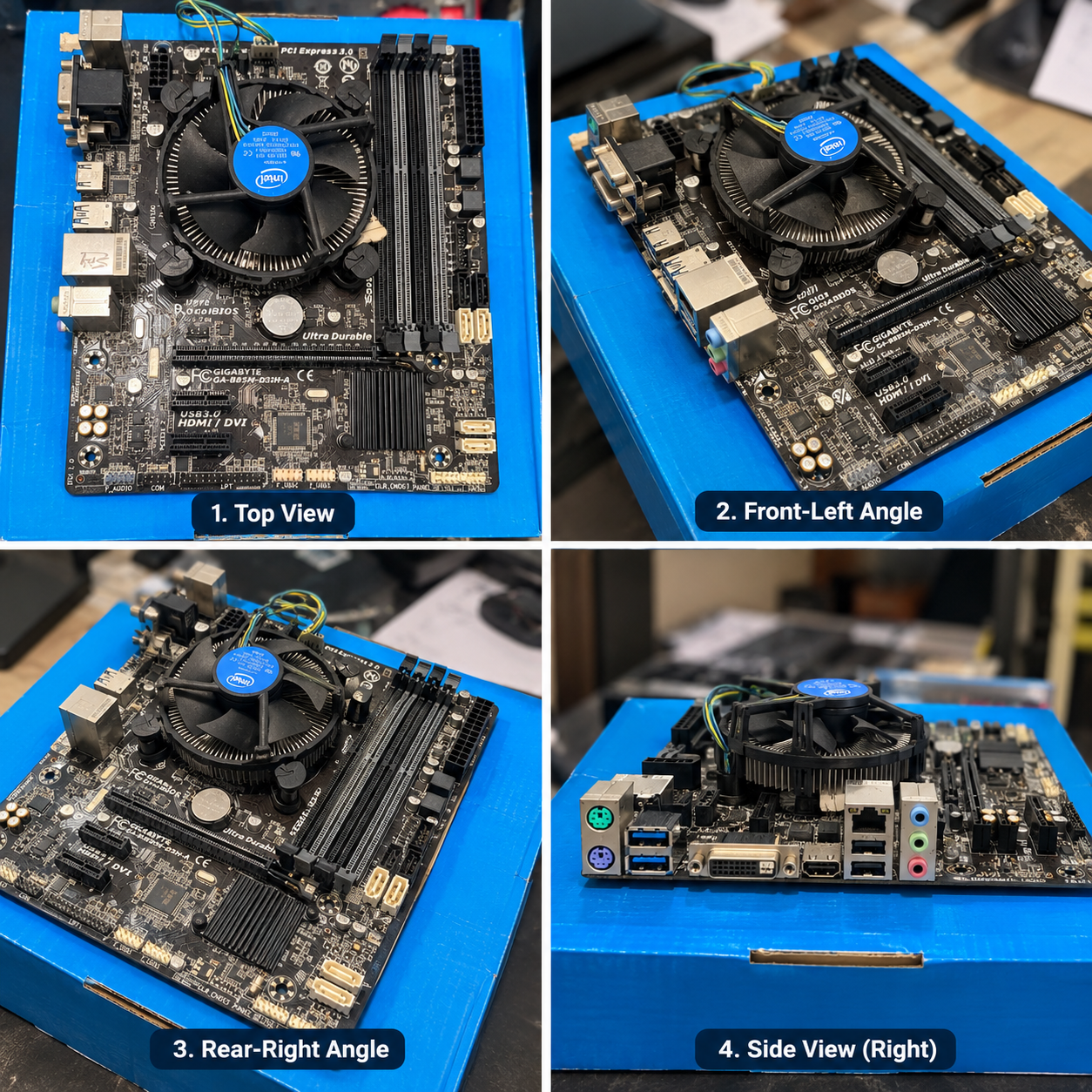
The Gigabyte GA-B85M-D3H-A is a compact Intel platform motherboard designed for desktop PC users who want a reliable and practical system for everyday computing, office work, multimedia, browsing and general-purpose use. The motherboard shown in the provided photographs features an Intel stock CPU cooler, multiple DDR3 memory slots, PCI Express expansion support and a range of rear I/O connectivity options.
Although this motherboard belongs to an older generation of PC hardware, it can still be useful for budget computer builds, replacement systems and users looking for an economical platform for compatible Intel processors and DDR3 memory.
Gigabyte GA-B85M-D3H-A at a Glance
| Motherboard | Gigabyte GA-B85M-D3H-A |
|---|---|
| Chipset Family | Intel B85 |
| CPU Platform | Intel desktop platform |
| Memory | DDR3 DIMM memory |
| Expansion | PCI Express expansion support |
| Graphics | Integrated graphics support through compatible Intel processors |
| Form Factor | Micro-ATX class motherboard |
| Cooling | Intel stock CPU cooler visible in the photograph |
Build Quality and Motherboard Design
One of the first things noticeable in the photograph is the traditional black Gigabyte PCB design. The board includes clearly separated areas for the processor, memory, expansion cards and storage connections. This layout makes the motherboard suitable for compact desktop configurations where space is important.
The motherboard also carries Gigabyte’s Ultra Durable branding. The design includes heatsinks around important chipset and power-related areas, helping provide passive cooling during normal operation.
The photographs also show the motherboard with an Intel stock CPU cooler installed. This is a common cooling solution for compatible Intel processors and is generally suitable for standard desktop workloads when the processor is operated within its normal specifications.
Processor Support
The B85 platform was developed for Intel’s mainstream desktop processors of its generation. The GA-B85M-D3H-A uses an Intel desktop CPU socket and is designed around the B85 chipset. Depending on the exact processor and BIOS version, the platform can be used with compatible Intel Core, Pentium and Celeron processors from the supported generation.
Anyone purchasing this motherboard second-hand should check the exact CPU model already installed on the board. BIOS compatibility is also important when replacing or upgrading the processor.
DDR3 RAM Support
The motherboard shown in the image features four DIMM slots positioned beside the CPU cooler. These slots are designed for DDR3 desktop memory.
Having four memory slots gives users flexibility when upgrading their system. Instead of replacing existing memory immediately, compatible modules can potentially be added to available slots, subject to the motherboard’s supported memory configuration and maximum capacity.
For a used motherboard, it is recommended to test every RAM slot individually if possible. Memory-related problems can sometimes be caused by the RAM module, slot, CPU socket or BIOS configuration, so proper testing is important before purchasing.
PCI Express Expansion
The GA-B85M-D3H-A includes PCI Express expansion capability. The main PCI Express slot can be used with a compatible dedicated graphics card or other supported expansion hardware.
This makes the motherboard more flexible than a basic office-only motherboard. A compatible graphics card can be installed for applications that require additional GPU performance. However, users should consider the power supply, case space and processor performance before selecting a graphics card.
Storage Connectivity
Storage connectivity is another important feature for any desktop motherboard. The board provides SATA connectivity for compatible storage devices such as hard disk drives and SATA solid-state drives.
Installing a SATA SSD can significantly improve the everyday responsiveness of an older PC compared with using a traditional mechanical hard drive. For budget users, combining this motherboard with a suitable SATA SSD can be a practical way to build an inexpensive computer for browsing, office applications and media consumption.
Rear I/O Connectivity
The rear I/O section visible in the photograph contains several useful connectivity options. Depending on the configuration and supported processor, users can connect display devices, USB peripherals, networking equipment, audio devices and other accessories.
The visible rear panel includes USB ports, display connectivity, Ethernet networking and multiple audio connectors. This makes the board suitable for a traditional desktop PC setup without necessarily requiring additional expansion cards for basic connectivity.
Who Should Consider This Motherboard?
The Gigabyte GA-B85M-D3H-A can be considered by users looking for an economical platform for an older Intel desktop system. It may be useful for home office computers, basic browsing machines, educational PCs, media systems and budget desktop builds.
It can also be useful as a replacement motherboard for an existing compatible computer. However, because this is an older platform, buyers should carefully check the condition of the motherboard and verify compatibility with the processor, RAM, storage and power supply.
Potential Advantages
- Compact motherboard design
- Four visible DDR3 memory slots
- PCI Express expansion support
- SATA storage connectivity
- Multiple rear I/O connections
- Suitable for budget and older Intel PC builds
- Intel stock cooler is visible in the photographed setup
Things to Check Before Buying
- Confirm the exact CPU model and socket compatibility
- Test all RAM slots
- Check whether the motherboard successfully boots
- Inspect the CPU socket for damaged or bent pins
- Check SATA and USB ports
- Verify the BIOS version where applicable
- Inspect the board for corrosion, physical damage or damaged capacitors
- Confirm that the required I/O shield and accessories are included
Used Motherboard Buying Guide
If you are purchasing the GA-B85M-D3H-A as a used motherboard, physical inspection is very important. Look carefully around the CPU socket, RAM slots, PCI Express slot and power connectors. Dust is usually not a major concern if the board can be properly cleaned, but corrosion, broken connectors or visible PCB damage should be investigated carefully.
The best way to verify a used motherboard is to test it with a compatible processor, known-good RAM, power supply and display output. Check whether the system enters BIOS and whether all important ports and slots function correctly.
Is the Gigabyte GA-B85M-D3H-A Still Useful?
For modern high-performance gaming and demanding professional workloads, newer motherboard platforms offer substantially more recent technologies and hardware support. However, that does not mean an older B85 motherboard has no practical value.
For basic computing, office applications, web browsing, online learning, media playback and light desktop use, a properly working system based on this motherboard can still be useful. Adding an SSD and sufficient RAM can also make an older computer feel considerably more responsive for everyday tasks.
Final Thoughts
The Gigabyte GA-B85M-D3H-A shown in the photographs is a practical example of an older Intel desktop motherboard featuring DDR3 memory support, PCI Express expansion, SATA connectivity and a useful selection of rear I/O ports. The photographed board also includes an Intel stock CPU cooler, making it representative of a complete older-generation desktop setup.
For buyers interested in used computer hardware, the main priority should be verifying the actual working condition and compatibility of the motherboard rather than relying only on its appearance. A properly tested GA-B85M-D3H-A can be a useful component for an economical replacement PC or basic desktop build.
Frequently Asked Questions
1. What is the Gigabyte GA-B85M-D3H-A?
It is a Gigabyte desktop motherboard based on the Intel B85 platform and designed for compatible Intel processors and DDR3 desktop memory.
2. Does the motherboard support DDR3 RAM?
Yes. The motherboard shown in the photograph has four DIMM slots designed for DDR3 desktop memory.
3. Can a graphics card be installed?
Yes, the motherboard provides PCI Express expansion capability for compatible graphics cards and other expansion devices.
4. Is it suitable for a budget PC?
A properly working board can be suitable for an economical older-generation desktop, especially for office work, browsing, education and general computing.
5. Should I buy this motherboard used?
If buying used, check the CPU socket, RAM slots, PCI Express slot, SATA ports, USB ports, BIOS operation and overall PCB condition before completing the purchase.